Free AI Vocal Remover Online

Easily isolate vocals and instrumental music, creating backing tracks or acapella tracks from any song with studio-quality results.

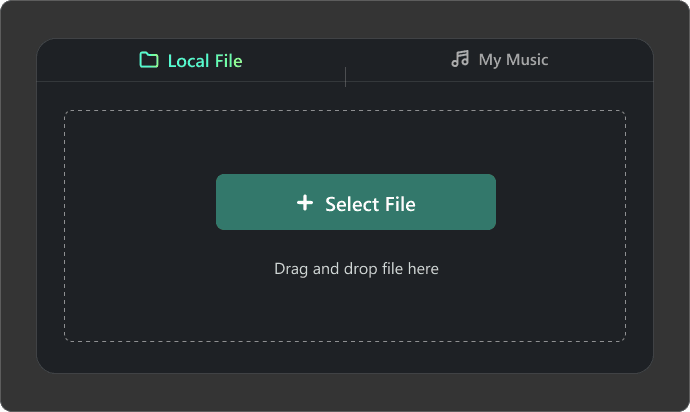
Local File
My Music
Select File
Drag and drop file here
Maximum file duration: 10 min, maximum file size: 100 MB
Separate
cost 5 credits/min

Why Choose the Ultimate AI Vocal Remover?

  • Clean & Studio-Quality AI Vocal Removal

    Experience crystal-clear separation of vocals and instrumentals with Somio AI vocal remover. Whether it’s a complex or simple track, the tool delivers high-quality results, automatically reducing background noise while preserving the natural tone of vocals and music.

  • Isolate Vocals and Instruments in Seconds

    Upload local files or select tracks from the music created by Somio and let AI remove vocals from a song, separating vocals and instrumental music in seconds. Perfect for creating acapella tracks, karaoke versions, or backing tracks for practice, remixing, and content creation.

  • Works with All Popular Audio Formats

    Somio vocal remover supports MP3, WAV, M4A, FLAC, OGG, and more, enabling smooth vocal removal from any song or audio file. Export your isolated vocals or instrumentals in the format you need, ready for high-quality remixing, music production, or sharing online.

  • Advanced AI-Powered Vocal Remover

    Powered by a cutting-edge artificial intelligence algorithm, Somio AI vocal remover analyzes complex audio to separate vocals and instrumentals with precision. In seconds, you can get clean, distortion-free results with minimal artifacts, ready for any creative projects.

How to Remove Vocals from a Song?

Our AI vocal remover automatically separates vocals and instruments from music in seconds. With a few clicks, you'll get crystal-clear backing tracks and acapella.

Upload a file or choose from library
AI separates vocals and instrumental
Preview and download the tracks

Upload a File or Choose from Library

Click "Select File" to upload your audio file or select from "My Music" to use your AI-generated song in Somio library, then click "Separate" to begin. Our vocal remover supports MP3, WAV, M4A, FLAC, OGG, and more.


AI Separates Vocals & Instrumental

By using advanced AI algorithms, Somio ultimate vocal remover automatically analyzes your track and splits it into two clean parts: isolated vocals and instrumental music. No manual work, just fast, precise results.

Preview & Download the Tracks

Listen to the separated tracks online and download both the acapella (isolated vocals) and instrumental tracks in MP3 or WAV format — ideal for karaoke, remixing, music production, and creative projects.

Other Features of Somio AI Vocal Remover

  • Free & Online Vocal Remover

    Separate vocals and instrumental music online without installing anything. Our free vocal remover is easy to use and delivers high-quality results instantly, with no hidden fees, letting you work with MP3, WAV, or other file formats for karaoke or practice.

  • Extract Backing Track with 1 Click

    Upload your song, and the AI vocal remover will automatically separate vocals from instruments in an instant, with no technical skills required. You’ll get two tracks: an acapella version (isolated vocals) and a clean instrumental for immediate use.

  • Remove Vocals from Any Song

    Our online vocal remover lets you upload from your device or choose AI-generated tracks from Somio library. Remove vocals from a song in a flash and get clean vocal and instrumental tracks for karaoke, mashups, background music, and video editing.

  • Create Karaoke Tracks Easily

    Use Somio AI vocal remover to extract clean instrumental tracks or studio-ready acapella versions for singing, rehearsals, live performance, covers, and remix projects, with minimal vocal bleed and distortion across multiple audio formats.

  • Isolate Vocals on Any Device

    Separate audio files into vocal and instrumental tracks using Somio vocal remover on your computer, phone, or tablet with no installation required. Access your files anywhere, remove vocals from songs and get high-quality background music on the go.

  • Keep Audio Files Safe & Private

    All your audio files are processed in real time and automatically deleted from our servers within 2 hours. Your music remains accessible only to you. Somio vocal remover does not share or store your files, ensuring complete privacy.

AI Vocal Remover for Any Creative Project

Whether for music, karaoke, remixing, or podcasts, Somio AI vocal remover helps creators isolate vocals and instrumentals quickly for practice, performance, and content creation.

  • Karaoke and Singing Practice

    Karaoke and Singing Practice

    Isolate clean instrumental versions of songs for singing, rehearsal, or live performance. With Somio online vocal remover, singers and karaoke enthusiasts can easily remove vocals to practice favorite songs.

  • Remixing and Sampling

    Remixing and Sampling

    Musicians and DJs can remove vocals to create unique remixes, covers, or samples. Extract instrumental music or vocals, and add effects or additional instruments to produce professional, polished tracks.

  • Music Learning and Instrumental Practice

    Music Learning and Instrumental Practice

    Remove vocals to isolate instruments for music lessons, rehearsals, or DAW practice. This enables students and educators to refine timing, pitch, and arrangement skills while studying individual vocal and instrumental layers.

  • Video or Podcast Editing

    Video or Podcast Editing

    Use Somio vocal remover to split vocals and backing music and generate clean audio for video, podcast, or narration projects. Easily remove vocals from music to improve clarity and simplify background audio replacement.

FAQs About AI Vocal Remover

  • What's the best AI vocal remover for clean audio?

    The best vocal remover delivers clean, natural sound, handles complex tracks, and is easy to use. Somio AI vocal remover stands out by using powerful AI to accurately isolate vocals and instrumentals in seconds, with minimal residual vocals or distortion, making it a reliable choice for creators seeking high-quality results.

  • How can I remove vocals from a song easily?

    Removing vocals from a song is simple using Somio vocal remover and isolation, even if you have no editing experience. Just follow these quick steps:
    1. Head to our vocal remover, click "Select File" to upload your track, or go to the My Music tab to choose a track generated by Somio.
    2. Once uploaded, our powerful AI will instantly analyze your song and separate vocals from the instrumental in seconds.
    3. Preview and download isolated vocals or instrumental tracks.

  • Is there a free vocal remover I can use online?

    Of course, Somio AI vocal remover is free to use online with no setup required. It lets you remove vocals from a song quickly on any device and preview or download results with no hidden fees.

  • Is it safe to use Somio AI vocal remover?

    Yes, Somio ultimate vocal remover is designed with privacy and security in mind. Your files are processed securely and automatically deleted from our servers within 2 hours. We do not store, share, or use your files for AI model training, ensuring complete privacy.

  • Which audio formats can I upload and process?

    Our online vocal remover supports all major audio formats, including MP3, WAV, M4A, FLAC, OGG, and more. You can upload your music without conversion and quickly extract vocals or instrumentals for karaoke, remixing, or learning.

  • How are credits deducted for Somio AI Vocal Remover?

    Somio music vocal remover deducts credits based on the duration of the audio you process at a rate of 5 credits per minute. Processing durations of 30 seconds or more are counted as 1 minute (for example, 1 minute 40 seconds is charged as 2 minutes; 1 minute 20 seconds is charged as 1 minute). Note: Any individual task under 30 seconds is uniformly charged as 1 minute.

Give Us 5 Stars!

If you like our AI Vocal Remover, please rate us 5 stars!

0 out of 5 stars, 0 Ratings

Last updated: 2026-03-20

  >   Vocal Remover