Free Online Audio Trimmer

Trim audio files online for free. Cut MP3 files, music, and sound files instantly in your browser.

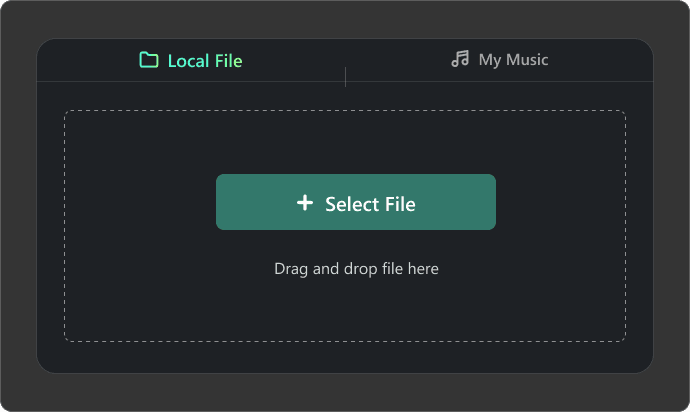
Local File
My Music
Select File
Drag and drop file here
Maximum file duration: 60 min, maximum file size: 500 MB

Why Choose Our Online Audio Cutter?

Quickly trim audio to extract the exact parts you need, create perfect clips, and edit with precision effortlessly.

  • Cut Audio Files Cleanly and Precisely

    Our audio trimmer lets you cut audio accurately using waveform editing, draggable sliders, or exact timestamps. Add fade-in and fade-out effects, preview edits in real time, and trim music, podcasts, or ringtones quickly without losing audio quality.

  • Support Multiple Formats and Large Files

    Cut MP3, WAV, M4A, AAC, FLAC, OGG, WEBM, and OPUS files up to 500MB with no duration limits. Trim podcasts, music, lectures, interviews, and recordings smoothly, then export high-quality MP3 or WAV files optimized for playback across devices and platforms.

  • Cut MP3 Online Without Losing Audio Quality

    Somio free audio trimmer keeps your sound clear and natural while cutting music clips, shortening voiceovers, or editing podcast segments. Smart processing minimizes quality loss, preserving crisp vocals, balanced audio, and professional sound for content creation.

  • Crop MP3 and Remove Unwanted Parts Instantly

    Start immediately with our online audio cutter and trim audio in seconds. Remove silence, fix mistakes, and trim MP3 files with a seamless workflow. Perfect for social clips, podcasts, and voice memos, it lets you edit music online and export clean results right away.

How to Trim Audio with Somio AI?

Upload Your Audio File
Select the Part You Want to Cut
Preview and Export the Result

Upload Your Audio File

Upload your audio by dragging files into the free audio editor, or click "Select File" to choose a file from your device or a song from "My Music" in your Somio library. Our audio trimmer supports MP3, WAV, M4A, AAC, FLAC, and more, so you can start editing instantly without file conversion.

Select the Part You Want to Cut

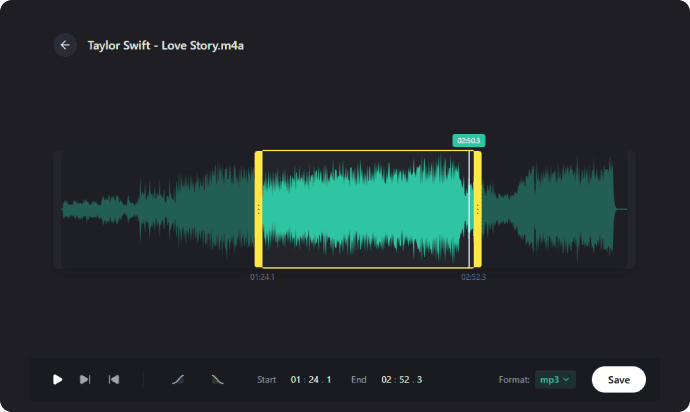
Use draggable sliders or timestamps to select the exact section to trim. The waveform view helps you spot vocals, pauses, and highlights, making audio cutting more precise for music, podcasts, and social clips.

Preview and Export the Result

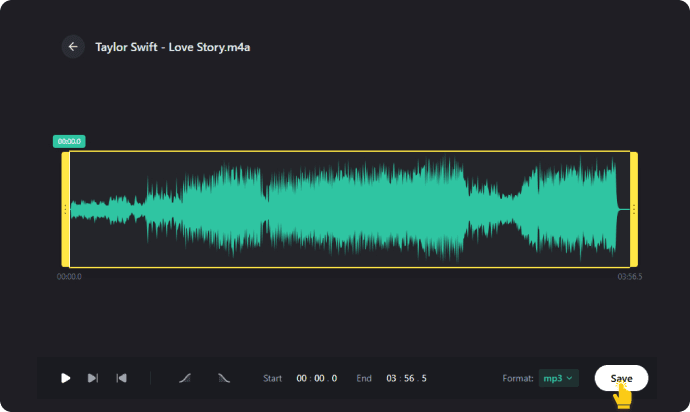
Preview your trimmed audio in real time to ensure smooth, natural-sounding cuts. Once you are satisfied, click "Save" to export the file instantly as an MP3 or WAV file, preserving the original audio quality.

Trim Audio Now

More Features of Our MP3 Audio Cutter

  • Trim Audio on Any Device for Free

    The online audio trimmer is completely free to use with no watermarks. It works directly in your browser on Windows, macOS, Android, and iOS with no installs needed, letting you cut music, podcasts, or ringtones with ease.

  • Crop Audio with Fade In/Fade Out

    Somio MP3 cutter lets you add fade-in and fade-out effects, turning abrupt cuts into smooth audio transitions. Volume rises and fades naturally, creating seamless listening for music, podcasts, meditation tracks, and cinematic audio.

  • Trim Audio Files with Real-Time Preview

    Our audio cutter offers real-time previews, so you can listen and tweak trims on the spot. Avoid mistakes and ensure every cut sounds polished, perfect for speech, interviews, podcasts, or music with exact timing.

  • Cut MP3 for Ringtones, Podcasts, Clips

    Somio music trimmer adapts to every audio task: cut songs, trim podcasts, edit voice notes, or prep clips for social media and presentations. Its versatile workflow makes audio editing simple for beginners and pros alike.

  • Easily Trim Audio Files Online

    With our online audio cutter, trimming audio is fast and effortless. The beginner-friendly interface lets you upload files, set trim points, preview edits, and export in a flash — no tutorials or complicated skills required.

  • Cut Audio Safely and Securely

    The free audio trimmer keeps your files secure by processing everything locally on your device. There are no uploads to external servers or ads, making it ideal for private recordings, interviews, or personal voice memos.

All-in-One Audio Cutter and MP3 Trimmer

Refine your sound with our precision trimmer, then take it further by removing vocals or splitting stems to unlock full creative control over your tracks.

  • Create Custom Ringtones from Songs

    Create Custom Ringtones from Songs

    Want your favorite part of a song as your ringtone? Somio audio clipper makes it simple and fast. Upload any track, trim the section you love, adjust volume, add fade effects, and export a polished, personalized ringtone ready to use in seconds.

  • Cut Music for TikTok, YouTube & Instagram

    Cut Music for TikTok, YouTube & Instagram

    Make your social media audio shine with our online audio cutter. Trim music, sound effects, or voice clips quickly and optimize them for TikTok, Instagram Reels, and YouTube Shorts, ensuring every clip sounds polished and ready to share.

  • Trim MP3 Files for Podcasts and Voiceovers

    Trim MP3 Files for Podcasts and Voiceovers

    Somio MP3 trimmer helps podcasters and voiceover artists polish recordings quickly and efficiently. Remove silence, trim mistakes, shorten intros, and preview edits in real time to achieve precise, professional results without complex editing skills.

  • Edit Audio for Online Courses & Presentations

    Edit Audio for Online Courses & Presentations

    Somio audio cropper makes online audio editing effortless for educators and learners. Trim lectures, correct errors, and shorten training recordings in seconds directly in your browser, delivering clean, professional results every time.

FAQs About Audio Trimmer

  • How can I trim my audio?

    You can easily clip audio using Somio online audio trimmer:
    1. Click "Select File" to upload an audio from your device, or pick a track from your Somio library.
    2. Select the exact section you want using draggable sliders or timestamps, and preview your edits in real time.
    3. Export your trimmed clip as MP3 or WAV instantly.

  • What is the best audio file trimmer for podcasts?

    For podcasts, the best audio trimmer should preserve audio quality while removing unwanted segments. Somio online audio cutter helps you quickly extract the parts you need, apply fade effects, and supports multiple audio formats, making it ideal for podcasters who want clean, professional-sounding audio without complex software.

  • Do Somio MP3 cutter reduce audio quality?

    Somio audio clipper lets you trim any audio file online without losing quality. Cut MP3 or other formats precisely while keeping music, podcasts, and voice recordings crisp and professional, so you can edit your audio with confidence.

  • How do you cut audio on your phone?

    You can trim audio online directly from your smartphone without installing any apps. Upload your track to our online MP3 cutter, select the portion you want to keep, and click "Save" to export it in seconds. This makes it easy to cut music tracks, ringtones, or vocal recordings on the go while maintaining original quality.

  • How do I apply fade-in and fade-out effects to my audio?

    To make transitions smoother, Somio audio cutter offers fade-in and fade-out effects. You can add these effects to your trimmed clips online while previewing the results in real time. This ensures professional-sounding audio for music, podcasts, or voiceovers, giving every project a polished finish.

  • Which audio formats can I upload and edit with the online audio trimmer?

    Somio online MP3 cutter supports MP3, WAV, AAC, FLAC, OGG, M4A, WEBM, and more, allowing you to trim audio without compatibility issues, even for large files. Edit them quickly and export in MP3 or WAV for seamless playback across devices.

Give Us 5 Stars!

If you like our audio trimmer, please rate us 5 stars!

0 out of 5 stars, 0 Ratings

Last updated: 2026-05-08

  >   Audio Trimmer