
You've probably heard a house track and thought, "I want that kind of energy in my own music." But once you look into traditional production, the process can seem much more complicated than expected. You may need a DAW, 909 drum samples, synths, bass sounds, and even plenty of time to try everything new.
How to make house music all by myself? It doesn't have to start with a blank DAW project, in fact. With an AI music generator, you can start with a simple idea or your own lyrics, then turn that input into a house track you can listen to, refine, save, and share. You still have creative control over the direction of your track; AI simply helps you move from an idea to something you can actually hear much faster.
That makes AI especially useful when you want to experiment quickly rather than spend hours learning every part of music production before hearing your first song. Here's your ultimate guide on how to make house music with AI. Let's get started!
What Makes a House Track Sound Like House?
The sound of house music is commonly associated with a steady four-on-the-floor kick, grooving percussion, bass, electronic textures, and soulful or memorable musical elements. A typical house tempo is often around 120–130 BPM, although the exact pace varies by style and creative direction.
The important thing for you is that house is less about following a complicated formula and more about creating a steady pulse, a strong groove, and a clear atmosphere. Traditional production guides often develop these elements one layer at a time before shaping the full arrangement.
House also covers a wide range of styles. You might prefer the warm, relaxed feel of deep house, the energetic sound of future house, the club-focused drive of tech house, and so on. You do not need to master every subgenre before you start; choosing one clear direction is often enough to give your first track a personality.
What Do You Need to Start Making House Music?
If you follow a traditional House music production workflow, you will normally work inside a DAW and build the track layer by layer. You might begin with a drum pattern, then add bass, chords, a lead, samples, effects, and finally an arrangement that turns those individual parts into a complete song.
Maybe you know the kind of track you want, but think about what happens when you are just starting. Even something as simple as how to make house beats can become a surprisingly technical question when you have to create every element yourself.
The good news is that these tools are no longer the only way to start — an AI house music maker brings a game-changing alternative. What you really need at the beginning is a clear creative direction: What should the track feel like? What instruments should stand out? Should it be dark, uplifting, romantic, chilled, energetic, nostalgic, or club-ready? Once you can describe that direction, an AI music generator can help turn your text description into fully produced house tracks in seconds.
How to Make House Music at Home?
You can make house music without turning your bedroom into a full production studio or installing heavy DAW software. With an fast yet professional AI house music maker like Somio AI, you can seamlessly bring your ideas to life across any device—whether you're working on a browser or making beats on the go.
Somio AI house music generator offers multiple ways to bring your ideas to life. You can describe a vibe or subgenre using Prompt mode, transform verses into catchy vocal hooks with Lyrics mode, generate pure 4-on-the-floor beats through BGM mode, or upload a reference track to capture its unique groove and drop rhythm for fresh, original tracks. That means you are not forced into one creative process when you are using Somio AI music creator.
What makes it even better is that you can easily customize featured tones like classic soulful female vocals and adjust their delivery. Within seconds, Somio house music producer generates a full house song with a complete arrangement, including Intro, Build-up, Drop, Breakdown, and Outro, giving you club-ready tracks ready to play or release immediately.
On top of these flexible creative tools, Somio AI house track creator lets you create online without installing a DAW or building a complicated setup. Your account and projects sync seamlessly across web and mobile platforms, letting you start wherever inspiration strikes and continue across devices.

- Studio-quality AI house music generation
- Create music from text, lyrics, or reference
- Fine-tune genre, mood, vocals, and instruments
- Complete songs with polished arrangements
- Rapid generation for quick creative iterations
- Export tracks in MP3 and WAV formats
- Simple, intuitive workflow for every creator
- Get 100% royalty-free house tracks for commercial use
- Customize vocal styles and delivery easily
- Use the built-in stem splitter to isolate tracks
How to Produce House Music Online
- Step 1Enter Your Idea: Open Somio house music generator, describe the house track you want to create with details such as mood, energy, tempo, instruments, vocals, and atmosphere. For example, ask for a 120 BPM deep house track with warm sub-bass, mellow electric piano chords, soft plucks, tight four-on-the-floor drums, and smooth female vocals. Or simply try a quick prompt like "energetic beach house track with upbeat female vocals" to get started.
- Step 2Customize Your Sound: Fine-tune your track by adjusting the mood, tempo, instruments, vocal style, and overall energy. Explore different house directions, from intimate deep house and soulful grooves to brighter, more energetic club sounds, and shape each element to match the vibe you have in mind.
- Step 3Generate Your House Music: Click "Create" to turn your idea and settings into original AI-generated house music. Let AI build the groove, melodies, vocals, and arrangement, then preview the result, make adjustments when needed, and save or share your finished track for your next project.
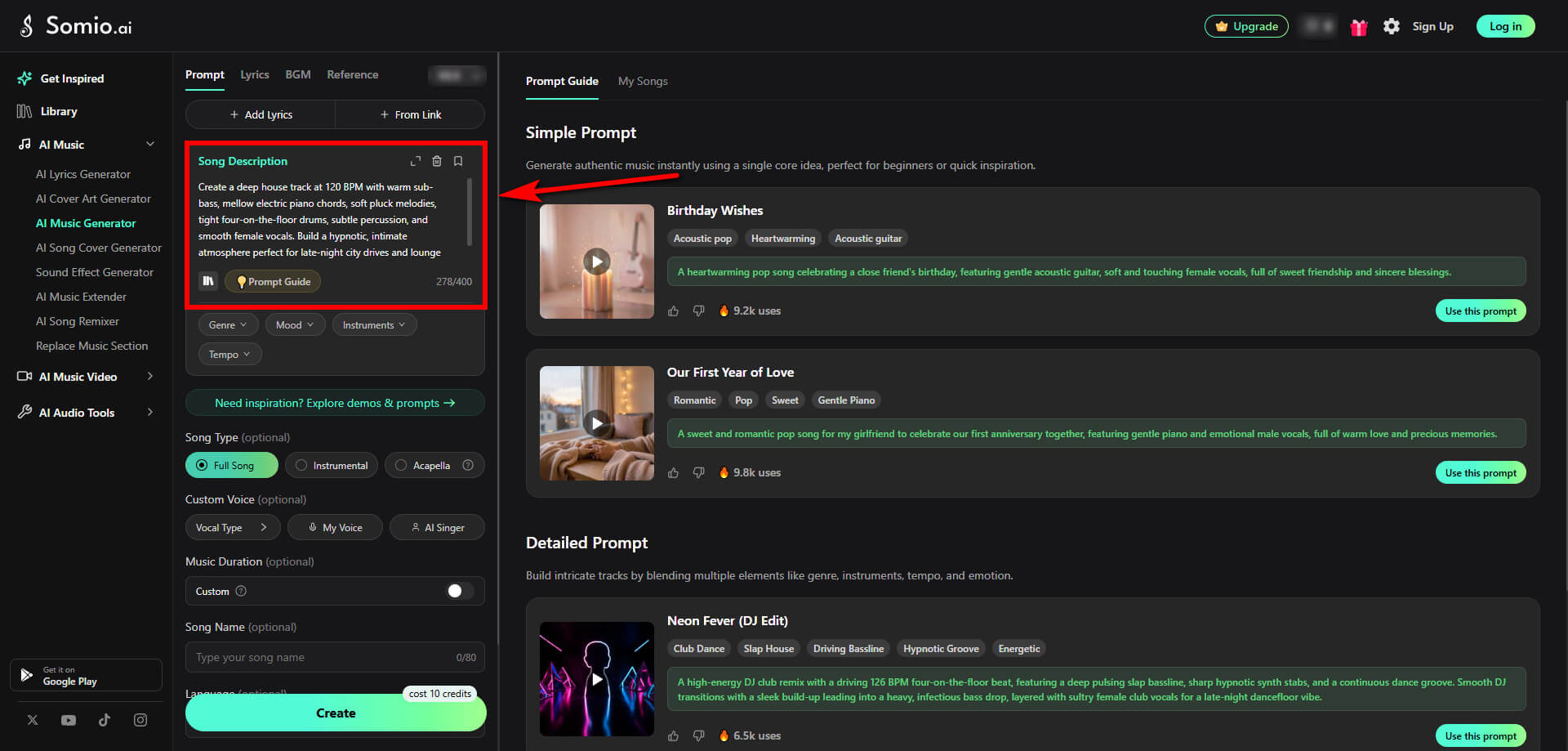
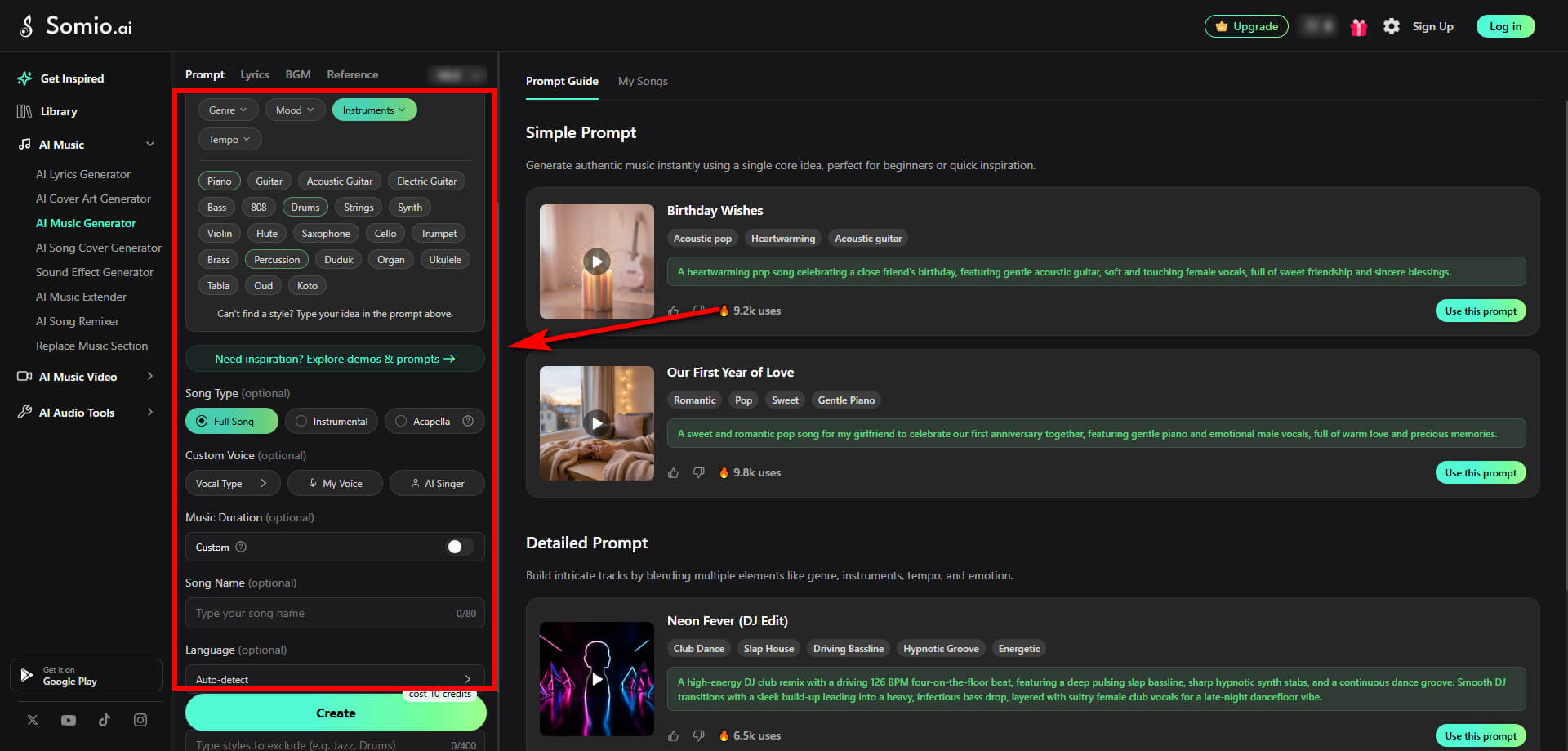
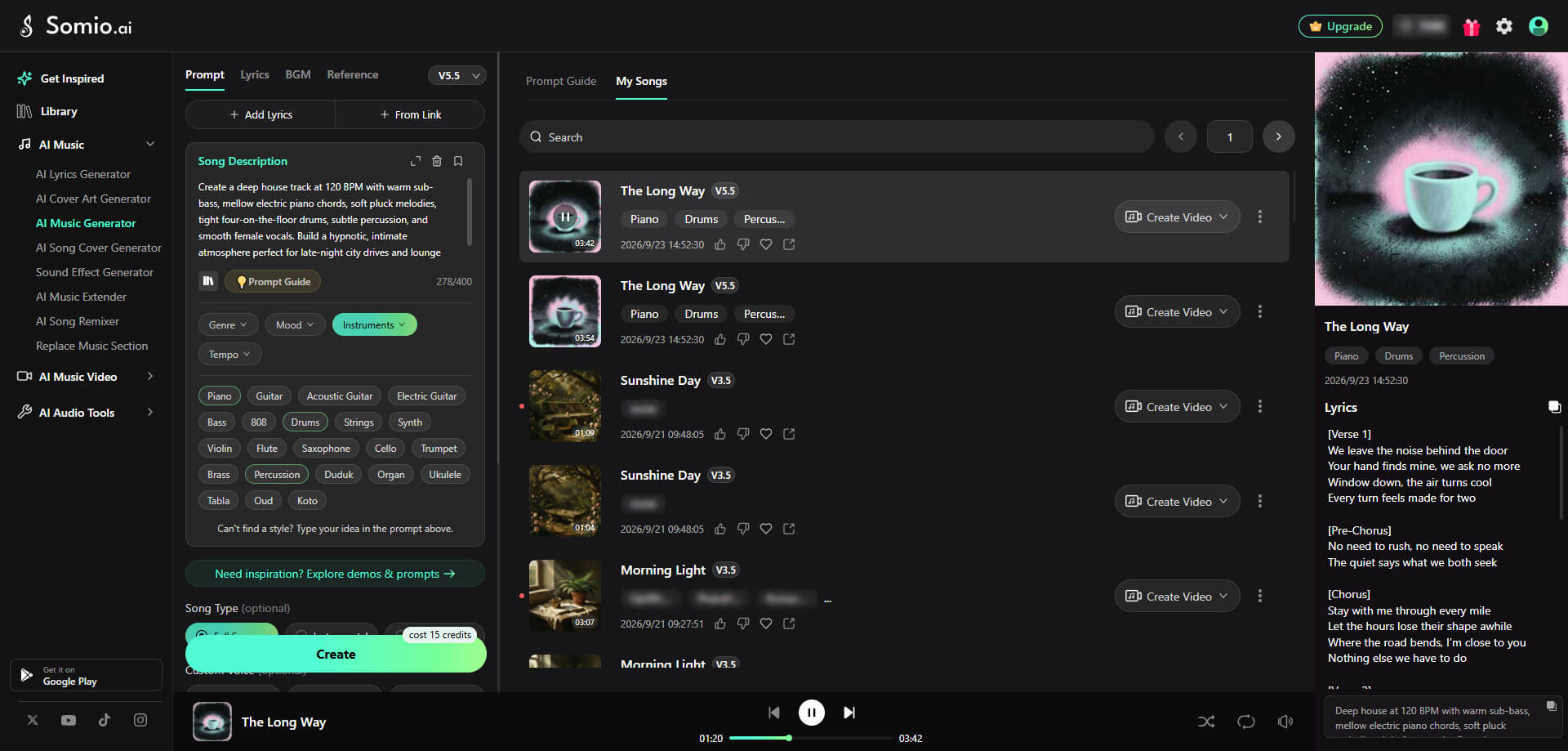
Tips: Somio AI house music maker gives you four practical answers to the same question. When you are wondering how to make house music, you can start with an idea in Prompt mode, start with words in Lyrics mode, start with a content requirement in BGM mode, or even use a song link as a style inspiration in Reference mode to guide the sound and create a new track. For a complete step-by-step walkthrough on bringing these modes to life, check out our guide on how to make AI music.
How to Make House Music on Phone
You do not have to stay at your computer, either. Somio AI house beat maker also offers mobile apps for Android and iOS, allowing you to create complete songs from text or lyrics, generate background music, customize styles, and preview, download, or share your tracks on the go.
Let's use Android as an example. Open the Somio app, choose the type of music you want to create, and then decide how you want to provide your creative direction. Here, we'll be working in the Prompt mode.
- Step 1Share Your House Concept: Tell Somio AI house music maker for Android what you want to hear, from deep house grooves to bright club rhythms. For instance, add details such as 120 BPM, warm sub-bass, electric piano, soft plucks, four-on-the-floor drums, or smooth female vocals.
- Step 2Polish the Creative Direction: Review Somio's AI-enhanced prompt and refine the mood, energy, tempo, vocals, instruments, or setting. Keep the suggested version or shape it further to match the exact house sound you want.
- Step 3Generate and Pick Your Favorite: Tap "Create Now" and let Somio build your house track in seconds. Preview the generated versions, choose the one you like, then download it in MP3 or WAV, recreate variations, rename it, or share it.
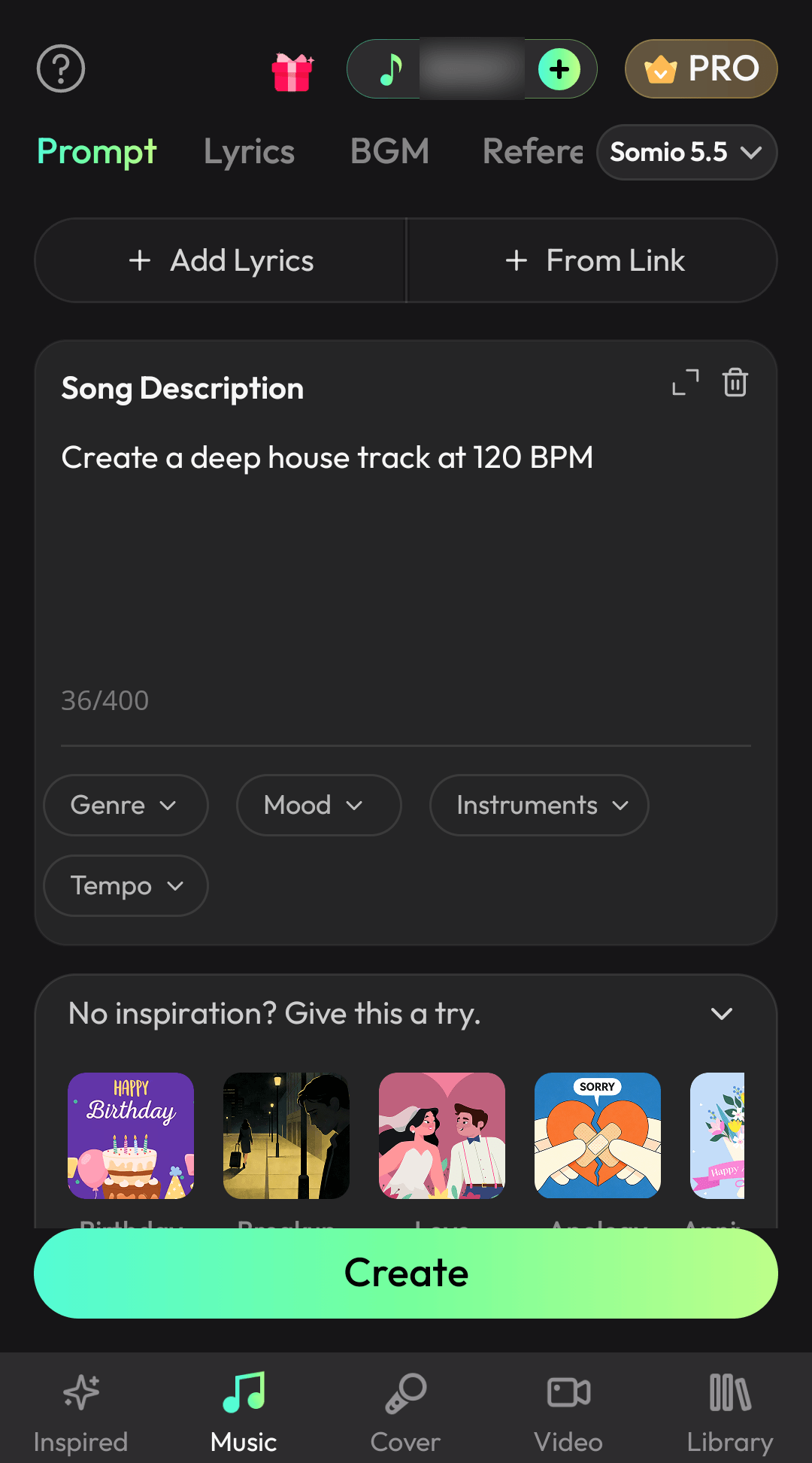
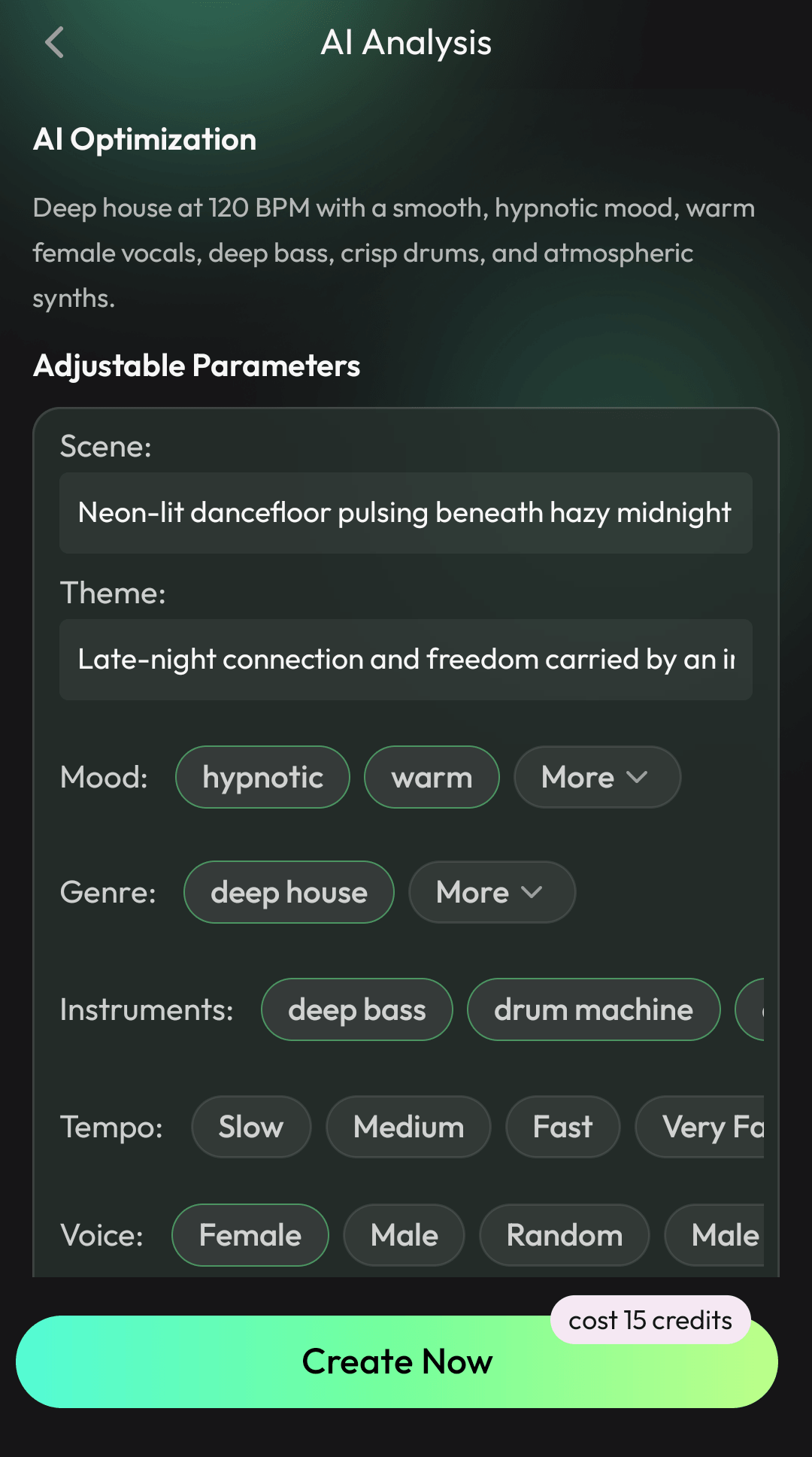
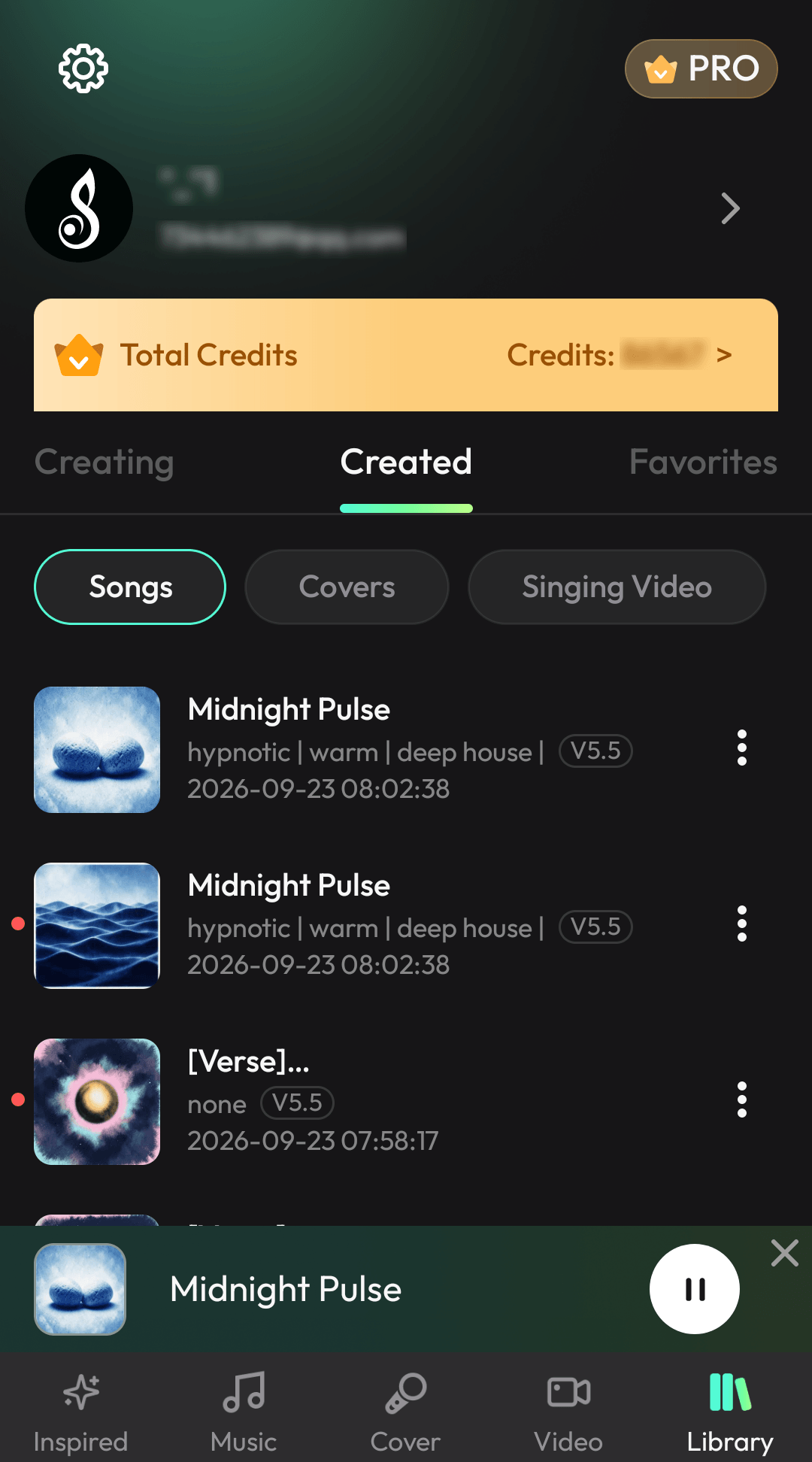
Tips: Somio AI house music generator on phone gives you the flexibility to capture house music inspiration wherever it strikes. Whether you want to quickly drop a brief idea, turn lyrics written on your phone into a catchy hook, generate background beats on the go, or feed a reference link while listening to a song you love, you can turn sudden sparks into complete house tracks right from your pocket.
5 Tips for Better AI House Music Results
Describe the Genre + Mood Clearly
Start with musical identity and emotional direction. Instead of writing "make house music," try something more specific such as "deep house with a warm, relaxed, late-night mood". This gives Somio music generation a much clearer starting point. It also helps you explore searches such as deep house music or future house music without needing to understand every production technique behind those styles.
Name the Core Instruments
Tell Somio which sounds you want to hear. You might ask for specific instruments. You do not need to list twenty instruments; two to five meaningful choices are often enough to define the sonic direction. This is especially useful when you have a very particular idea for your house music instruments but do not know how to recreate them manually.
Control the Energy and Tempo
Words such as chill, mellow, or uplifting can help describe the energy you want. You can also use tempo as a useful reference when you already have a target in mind. Traditional house tracks often sit in a broad 120–130 BPM area, but you do not need to treat that range as a strict rule.
Give the Music an Atmosphere or Scene
One of the simplest ways to make a prompt more vivid is to tell the Somio house music generator where or why the music should exist. Instead of describing sound in isolation, you are giving Somio a context for the sound. That can also help you explore very different directions.
Regenerate Instead of Overthinking the First Result
Your first generation does not have to be perfect. Listen to one or two things you like, identify what feels wrong, and change your prompt accordingly. This is where Somio AI track maker can make experimentation feel much more approachable: rather than rebuilding an entire project, you can keep refining the creative direction until a version feels closer to what you imagined.
Want to write more precise prompts that hit the exact groove you need? Check out our complete guide on how to write AI music prompts for expert formulas and examples.
Conclusion
Making house music does not have to mean opening a complex DAW project. Traditional production remains a powerful way to learn and create, but it is no longer the only place you can begin. When you are learning how to make house music, you can start from something much simpler: an idea in your head, lyrics you have already written, or a specific BGM requirement for your content.
That is exactly where Somio AI music generator can fit into your workflow. You also do not have to wait until you are back at your computer. With Somio's web and mobile ecosystem, you can continue your creative work across supported devices and pick up where you left off.
Ready to turn your house music idea into something you can actually hear? Try Somio AI house music maker and start creating your house track today.
FAQs About How to Make House Music
- Can beginners produce house music without music production experience?
Yes. You can start without knowing how to build a full DAW project or understand advanced music theory. With Somio AI music generator, you can describe your house music idea, add your lyrics, request BGM, or use a song link, then customize the mood, instruments, tempo, and vocal direction before generating your track.
- How do I make house music online without a DAW?
Use an online AI music generator such as the Somio AI song generator. Choose the house music maker, select Prompt, Lyrics, BGM, or Reference, enter your creative input, adjust the available sound settings, and generate your track directly from the browser. Somio's workflow does not require you to install a traditional DAW first.
- How can I turn my lyrics into house music?
Choose the lyrics mode in Somio and enter your own lyrics. You can then shape the song with settings such as mood, instruments, and vocal style before generating it. Somio's AI house music maker is designed to build melodies, rhythms, vocals, and electronic production elements around your words.
- Where can I make house music for free?
Somio AI house track creator gives you a simple online space to explore house music creation without a complicated setup. Start with a quick idea, experiment with different creative directions, and turn your inspiration into polished house tracks — all in one place.
- Which house music styles can Somio AI generate?
Somio AI house music generator can help you explore many house directions, including deep house, tech house, future house, tropical house, electro house, progressive house, bass house, and other electronic styles. You can also describe more specific directions such as classic, 90s, French, Latin, or soulful house in your prompt and refine the sound from there.
- How to make house beats?
A traditional house beat usually starts with a steady four-on-the-floor kick, then adds claps, hats, percussion, and bass to create movement and groove. With Somio AI house song maker, you can skip the manual drum programming and describe the beat you want, such as "punchy tech house drums with tight percussion and a driving bass groove," then generate and refine the result.
Prefer watching instead?
Watch the video tutorial.