
Finding the right free music creation software can feel overwhelming today, with so many tools available across different parts of the music-making process. Some platforms are designed for AI-assisted music creation, while others focus on recording, sequencing beats, editing audio, or building complete studio-style projects.
The good news is that in 2026, you no longer need expensive studio software to produce high-quality music.
In this guide, I’ll break down the best free music making softwares available right now, covering everything from the AI music generator and full digital audio workstations to beat-making environments and audio editing software. Whether you want to generate ideas with AI, record vocals, build beats, clean up recordings, or develop full music production skills from scratch, these tools can help you build a complete workflow without spending anything.
Key Features That Make Free Music Software Worth Using
The best free music software isn’t just about having lots of features — it’s about how effectively it supports the creative process. The ideal tools make it easy to turn ideas into music without unnecessary obstacles.
Ease of Use and Workflow: Music production already has a learning curve, so software that simplifies the process stands out. Intuitive layouts, accessible controls, and natural navigation help users add tracks, adjust settings, and experiment with ideas quickly. A smooth workflow prevents frustration and keeps creative momentum going, while cluttered or confusing interfaces can slow down progress.
Instrument and Sound Creation Options: Even free music software should make it easy to explore different sounds and styles. Tools that support customizable instrument selection or can generate full instrument-based tracks help users create music faster without relying heavily on external plugins. Flexible sound options are especially useful for beginners who want to experiment with genres, moods, and arrangements without spending hours setting up complex production workflows.
Editing Capabilities: Strong editing tools are crucial for shaping a track. Features such as multi-track editing, pitch and tempo adjustments, vocal removal, stem splitting, and audio-to-MIDI conversion can make the creative process more flexible. Advanced options like automation and effect processing help polish tracks efficiently, while software lacking these tools may require additional effort or external plugins.
Performance and Stability: Software stability has a direct impact on creativity. Programs that handle multiple tracks, virtual instruments, and effects without lag or crashes allow for uninterrupted workflow. Efficient resource management ensures smooth playback and real-time adjustments, while unstable software can disrupt the production process.
Export Options and Compatibility: Finally, the ability to export music in high-quality formats and work with other software is essential. Support for WAV, MP3, and other common file types, along with easy file transfers, ensures that compositions can be shared, published, or further edited without hassle.
Quick Comparison: 6 Best Free Music Production Software
| Tool | Feature | Ideal for | Platforms |
|---|---|---|---|
| Somio | AI-powered music creation, instant multi-version generation, fast audio editing tools | Quick creators, beginners, songwriters brainstorming | Windows, Mac, Android, iPhone |
| GarageBand | Drag-and-drop Apple Loops, Smart Instruments, seamless Apple ecosystem integration | Apple users, beginners | Mac, iPhone, iPad |
| Audacity | Precise waveform editing, noise reduction tools, supports VST plugins | Audio cleanup, podcast editing, recording restoration | Windows, Mac, Linux |
| LMMS | MIDI sequencing, built-in synths, Piano Roll & Beat+Bassline editors | Electronic music, beat making, beginners | Windows, Mac, Linux |
| Waveform Free | Unlimited tracks, full DAW features, VST/VST3/AU plugin support | Full-scale production, mixing, recording | Windows, Mac, Linux, Raspberry Pi |
| Reaper | Highly customizable, multi-track recording, advanced routing & automation | Advanced producers, engineers, long-term creators | Windows, Mac, Linux |
Take a Look at 6 Free Music Making Softwares
Somio - Best AI Free Music Creation Software for Fast Music Generation and Editing
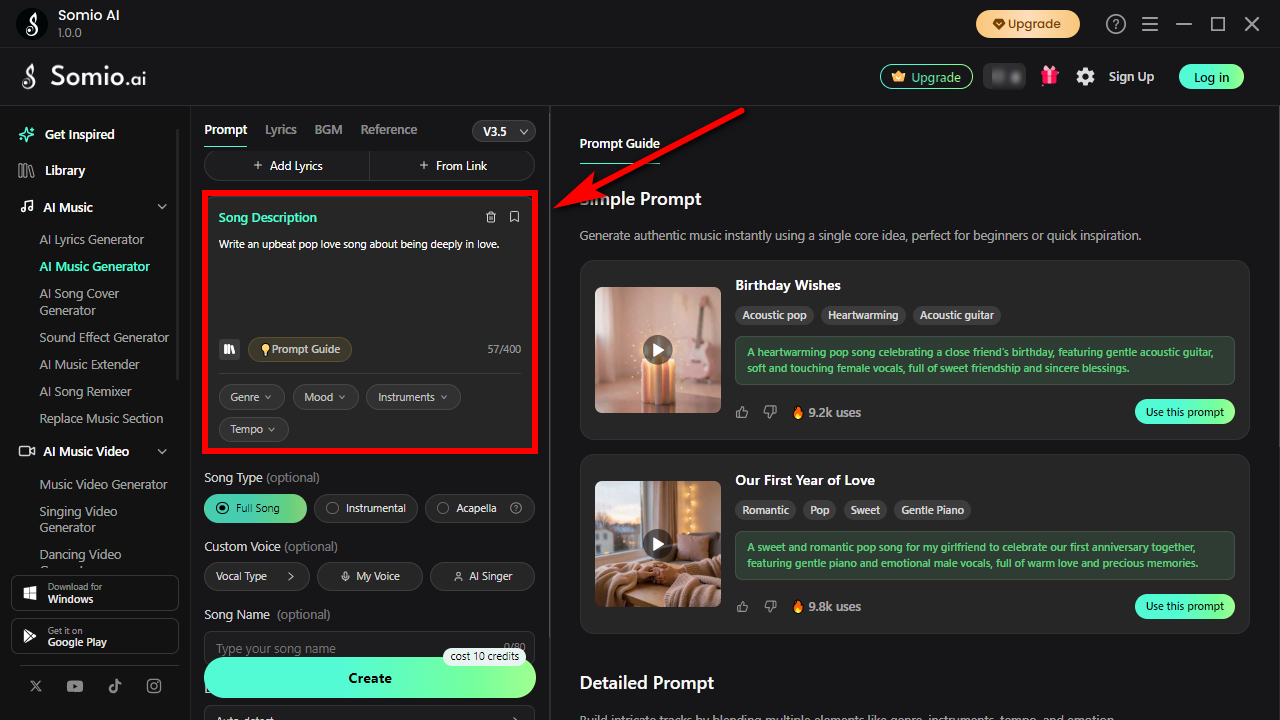
Somio AI music generator takes a fundamentally different approach to music creation compared with traditional DAWs. Instead of relying on complex MIDI sequencing, routing systems, or engineering-heavy workflows, it is built around speed, experimentation, and rapid idea-to-song conversion. You can turn simple text prompts, lyrics, or stylistic descriptions into full tracks in seconds, often generating multiple variations at once. This dramatically reduces creative friction and makes it easy to explore different moods, genres, or lyrical directions without starting from scratch each time.
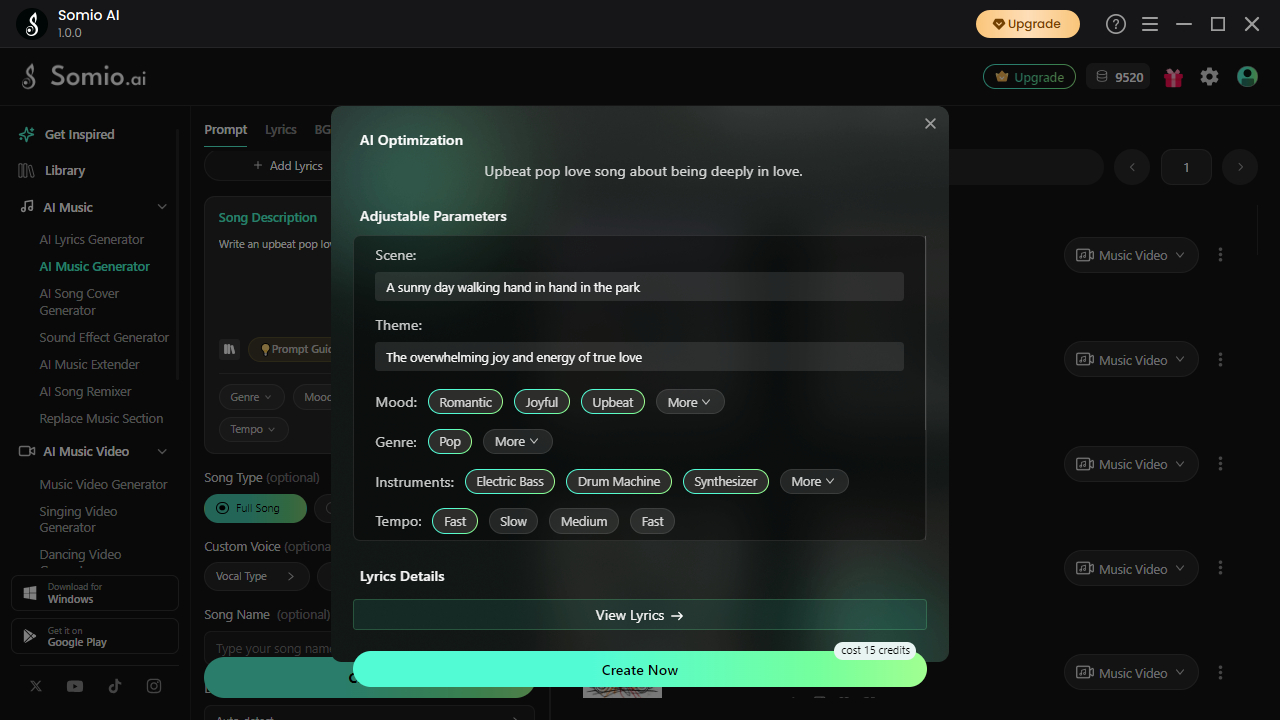
What sets the free music making software apart is that this speed does not come at the cost of usability, control, or output quality. The workflow remains simple as you only need to describe an emotion, paste lyrics, or reference a specific style to instantly generate a complete song. You can then refine the output through iterative prompt adjustments, regeneration of sections, or changes to vocal style and song structure. Despite this simplicity, it consistently produces surprisingly polished and coherent results, with generated songs often showing strong musical structure, emotional consistency, and clear genre awareness, especially when guided with detailed prompts.
The free music production software goes far beyond song generation, evolving into a complete AI-assisted creation suite. You can create song lyrics, remix songs, generate sound effects, extend tracks, generate songs from your voice, and instantly turn music into music videos or lyric videos. At the same time, it offers audio editing tools like stem separation, vocal removal, BPM and key detection, and other flexible audio editing features, giving you full control to break down and reshape any track with ease.

Pros
- Generates multiple songs in seconds or minutes
- Extremely beginner-friendly workflow
- Generates vocal tracks, instrumentals, and acapella tracks
- Generate music from prompts, lyrics, or reference tracks
- Strong customization for lyrics, mood, structure, and vocal style
- Includes AI audio editing tools
- Supports multilingual music generation
- Excellent for overcoming creative blocks and rapid ideation
- Cross-platform compatibility across Windows, macOS, Android, and iOS
Cons
- Lacks some advanced DAW-level production features
- Step 1Begin Your AI Music Project: Launch Somio free music creation software and choose your starting point, whether it’s Prompt, Lyrics, BGM, or Reference Mode. Describe a mood, genre, or creative concept in a few words, paste your own lyrics, or upload a reference track to guide the AI. For background music, simply explain the atmosphere you want to create and let the AI build the foundation for you.
- Step 2Shape the Sound Your Way: Fine-tune your track by adjusting genre, mood, tempo, vocal style, instruments, and overall energy. These creative controls help the AI music maker better understand your direction, making it easier to generate music that feels more personalized, polished, and aligned with your vision.
- Step 3Generate, Download, and Share: Click “Create” and watch your ideas turn into complete AI-generated songs within seconds to minutes. Preview multiple versions instantly, then download your tracks in MP3 or WAV format for videos, podcasts, social media, or personal projects. You can even continue editing, extend songs, or transform them into AI music videos and lyric videos directly inside the platform.

GarageBand - Best Free Music Creation Software for Apple Users
GarageBand is one of the easiest ways to start making music without paying for professional studio software. Available across Mac, iPhone, and iPad, the free music production software lets you quickly create songs, beats, podcasts, or demos using a clean and beginner-friendly workflow. You can drag in Apple Loops, play Smart Instruments that automatically stay in key, and build polished tracks within minutes even if you have no production experience.
The free song making software also includes virtual drummers, high quality instruments, guitar amp simulations, and multi-track recording for vocals or live instruments. Editing tools like EQ, compression, pitch correction, and reverb are built in while remaining easy to use. Another major advantage is Apple ecosystem integration, allowing you to move projects seamlessly between iPhone, iPad, and Mac, then upgrade directly to Logic Pro later as your production skills grow.

Pros
- Completely free on all Apple devices
- Extremely beginner-friendly interface
- High-quality built-in instruments and loops
- Excellent cross-device workflow between Mac, iPhone, and iPad
- Smooth upgrade path to Logic Pro
- Fast drag-and-drop music creation workflow
Cons
- Only available on Apple devices
- Limited plugin support compared to professional DAWs
- Advanced mixing and routing tools are missing
- Not ideal for large-scale professional studio projects
Audacity - Best Free Music Production Software for Audio Cleanup and Editing
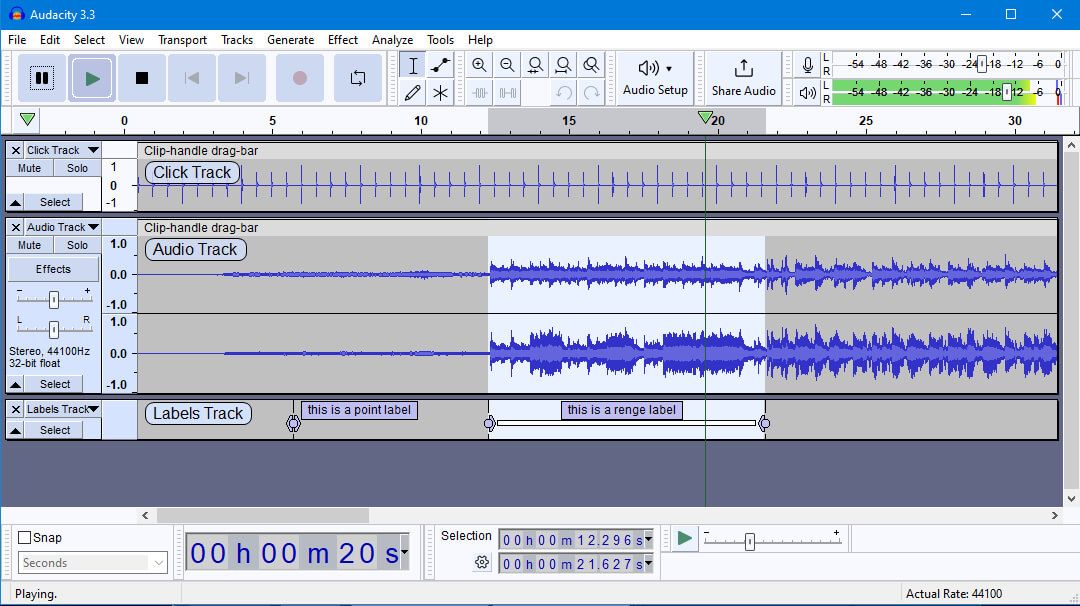
Audacity is one of the most reliable free music production software for fast, precise audio editing. Instead of focusing on full music production, it excels at cleaning vocals, editing podcasts, restoring samples, and improving voice recordings with minimal setup. You can quickly trim clips, normalize volume, remove background noise, and edit audio directly at the waveform level, making it especially useful for creators who need efficient audio cleanup rather than complex production workflows.
A major advantage of the free music creation software is its detailed waveform editing system, allowing you to precisely control, trim, repair, and reshape every section of your audio with accuracy. Its Noise Reduction tools are also extremely effective at removing hiss, hum, and other background noise from recordings. Despite being completely free, Audacity supports VST plugins, allowing you to expand it with professional EQs, compressors, reverbs, and restoration tools. Lightweight and easy to run on almost any computer, it remains one of the best free audio editors available today.
Pros
- Completely free and open-source with no restrictions
- Excellent for vocal cleanup and audio editing
- Powerful noise reduction tools
- Lightweight and runs smoothly on older computers
- Supports VST, AU, and LADSPA plugins
- Fast waveform-level editing workflow
Cons
- Not a full music production DAW
- No MIDI sequencing or virtual instruments
- Weak for beat-making and arranging
- Interface feels outdated compared to modern DAWs
- Limited real-time effect processing
- Advanced mixing and automation tools are basic
LMMS - Best Free Music Making Software for Electronic Music and Beat-Making
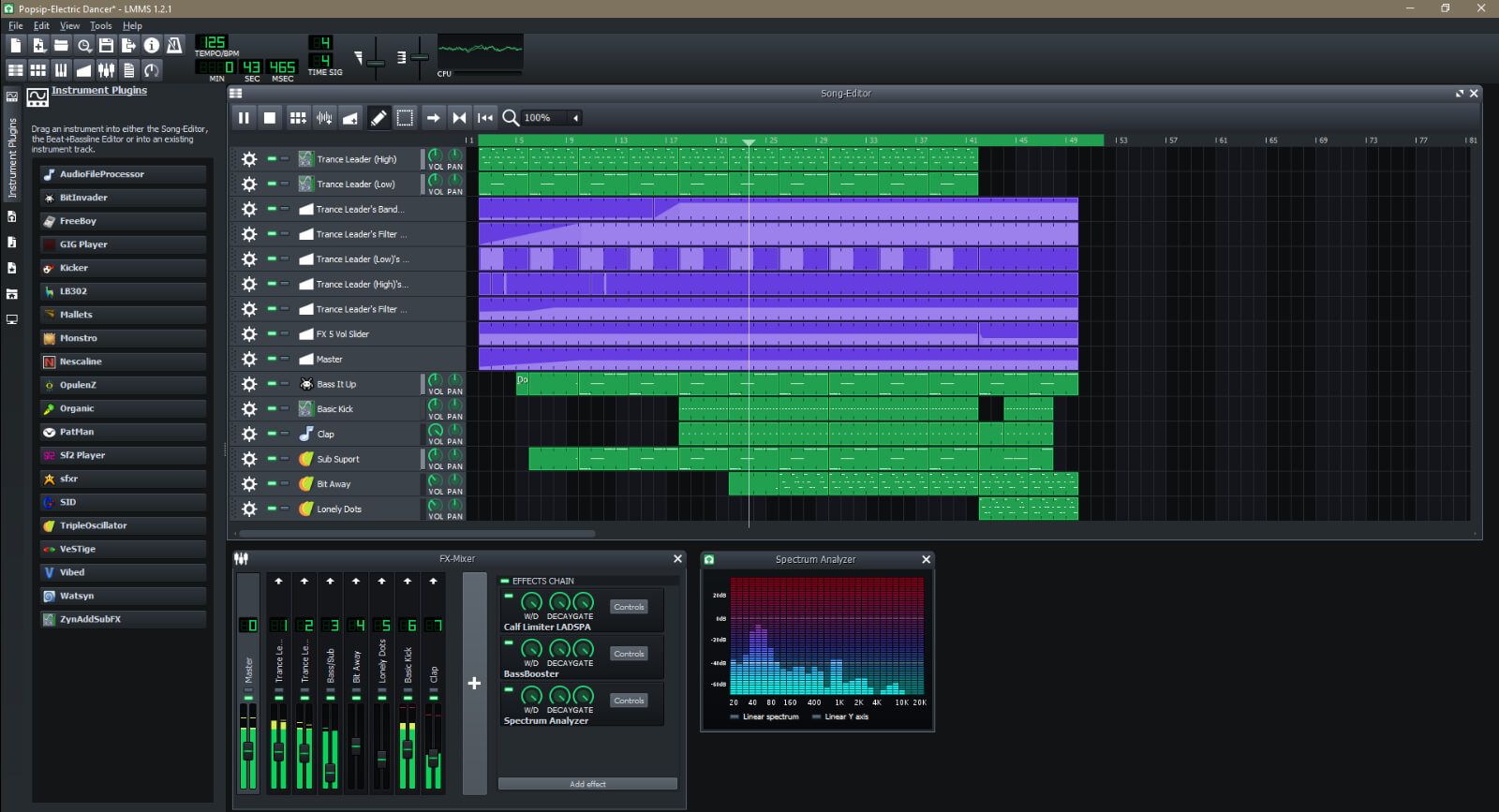
LMMS is a powerful free DAW built mainly for electronic music, beat making, and MIDI-based production. Inspired by FL Studio, the free music making software gives you a familiar pattern-based workflow for creating EDM, hip-hop beats, synth melodies, and loop-driven tracks without subscriptions, export limits, or locked features. Rather than centering the workflow around microphones and live instruments, LMMS is built for creating music through MIDI sequencing, pattern building, and electronic composition.
The music production software's standout features include the Piano Roll editor, Beat+Bassline Editor, and a wide range of built-in synths and electronic sound tools designed for EDM, hip-hop, and loop-based production. You can create drum patterns, stack melodies, automate effects, and shape full arrangements while learning the core fundamentals of modern beat making. With VST plugin support and smooth performance across Windows, macOS, and Linux, LMMS delivers a lightweight yet surprisingly capable production environment for beginner and electronic music producers.
Pros
- Completely free and open-source with no restrictions
- Excellent for EDM, hip-hop, and electronic music production
- Workflow feels similar to FL Studio
- Strong MIDI sequencing and piano roll tools
- Includes built-in synths and electronic sound generators
- Supports automation and pattern-based composition
- Available on Windows, macOS, and Linux
- Lightweight and beginner-friendly for low-spec computers
Cons
- No built-in audio recording support
- Not ideal for vocals or live instrument recording
- Interface feels dated compared to modern DAWs
- Built-in effects are relatively basic
- Limited VST3 plugin compatibility
- Learning curve can still feel technical for complete beginners
Waveform Free - Best Free Music Creation Software for Full Professional-Style Production
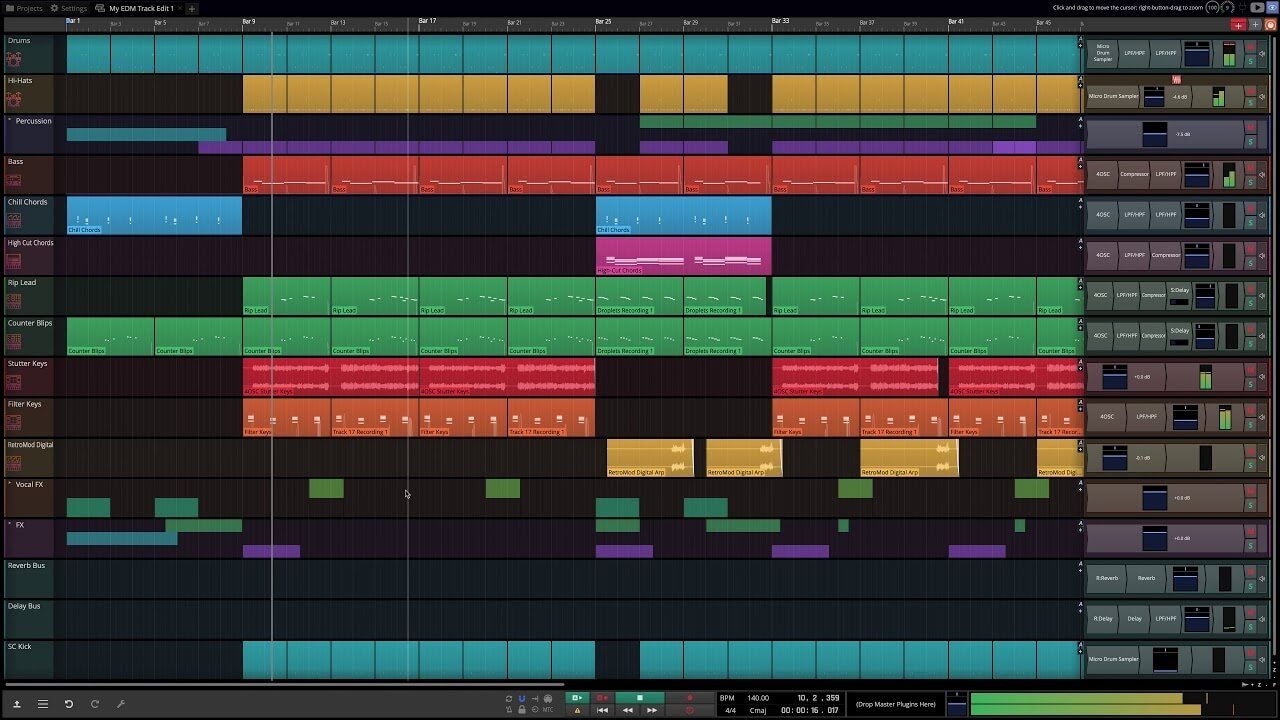
Waveform Free gives you a surprisingly professional music production experience without the restrictions normally found in free DAWs. Instead of limiting tracks, exports, or core tools, the free music production software lets you build complete projects with unlimited tracks, full recording capabilities, MIDI sequencing, and unrestricted project saving from day one. Whether you want to record vocals, produce beats, arrange songs, or mix full sessions, everything happens inside one streamlined workflow.
The music making software becomes even more powerful through its full plugin support for VST, VST3, and AU plugins, giving you access to professional instruments, effects, and mastering tools used in commercial studios. Another standout advantage is its cross-platform compatibility, allowing you to work smoothly across Windows, macOS, Linux, and even Raspberry Pi. Combined with stable performance and modern editing tools, Waveform Free feels much closer to a serious production environment than typical free music creation software.
Pros
- Truly unrestricted free DAW with no track limits
- Supports audio recording, MIDI production, arranging, and mixing
- Full VST, VST3, and AU plugin support
- No export restrictions or commercial-use limitations
- Excellent cross-platform support for Windows, macOS, and Linux
- Stable performance even in larger projects
- Professional workflow with long-term scalability
- Suitable for both beginners and advanced creators
Cons
- Workflow differs from traditional DAWs
- Initial learning curve can feel unfamiliar
- Some advanced production tools require the Pro version
- Plugin routing and setup may feel complex for complete beginners
Reaper - Best Free Music Producing Software for Professional Recording
Reaper is a powerhouse DAW that puts professional control in your hands. Unlike beginner-friendly software, it’s built for flexibility, letting you handle multi-track recording, MIDI sequencing, editing, mixing, mastering, automation, and even video scoring. You get full command over advanced routing workflows, allowing complex signal chains and precise automation that would feel restrictive in simpler DAWs. Reaper also excels in customization, letting you reshape menus, layouts, toolbars, and shortcuts, or even create scripts to fit your exact workflow.
Despite its depth, the free music production software runs efficiently on almost any system, handling heavy projects without crashing. Plugin support is mature, with full VST, VST3, and AU compatibility, letting you expand your toolkit without limits. While it has a steeper learning curve than GarageBand or browser-based tools, Reaper rewards patience with unmatched control, scalability, and performance, making it ideal for producers, engineers, and creators who want a serious, long-term production platform.

Pros
- Professional-grade recording, mixing, and mastering workflow
- Extremely customizable interface and workflow system
- Excellent CPU optimization and low resource usage
- Powerful routing and automation capabilities
- Outstanding for live recording and multi-track sessions
- Full VST, VST3, and AU plugin support
- Available on Windows, macOS, and Linux
Cons
- Not beginner-friendly for complete newcomers
- Interface and menus feel dated compared to modern DAWs
- Default workflow feels highly technical and engineering-focused
- Very few built-in virtual instruments or loops
- Requires users to build their own plugin ecosystem
- Learning curve is significantly steep
Conclusion: What is the Best Free Music-Making Software?
Creating music today doesn’t require expensive software or years of technical training to produce something meaningful. Free music creation software now covers the full spectrum — from AI-assisted songwriting and instant track generation to professional recording, beat-making, MIDI sequencing, and detailed audio editing.
Different tools cater to different creative needs. Some make getting started intuitive, others give you deep control over every sound, and a few excel at electronic or experimental production. The key is choosing the software that fits how you like to work: whether you prioritize speed, precision, or hands-on experimentation.
For creators who want to turn an idea into a complete song without delay, Somio free music creation software is particularly compelling. Its AI-powered generation, flexible lyric and style options, and intuitive editing tools let you turn inspiration into polished music faster than ever, making it a smart choice for both beginners and experienced producers looking for a creative edge.
Start your next hit today. Make your own song instantly with Somio for free!
FAQs about Best Free Music Creation Software
- How can I create my own song for free?
Use free music creation software like Somio to turn your ideas into songs. Start with Text, Lyrics, BGM, or Reference Mode, describe a mood, genre, or concept in a few words, paste lyrics, or upload a reference track. Then click “Create” to generate your song instantly. Finally, preview multiple versions and download them in MP3 or WAV formats for videos, podcasts, or personal projects.
- What is the best free software to create music?
The best free music making software combines AI songwriting, flexible audio editing, and full export options. Somio lets you compose melodies, arrange tracks, and add effects without paywalls. It’s ideal for beginners or experienced creators looking for a complete, free tool to produce professional-sounding music.
- What is the easiest free music production software?
Somio free music making software for beginners guides you from prompts to finished tracks in minutes. You can adjust music style, mood, tempo, and instruments with AI assistance, then preview, download, and share your songs, all without complex DAW setups or prior music experience.
- What is the difference between a DAW and audio editing software?
A DAW handles full music production, letting you compose, arrange, sequence MIDI, record, and mix multi-track projects. Audio editing software focuses on trimming, cleaning, and restoring recordings. Tools like Somio free music production software combine both, offering AI-assisted songwriting with flexible audio editing, so you can create, polish, and export complete songs from a single platform.